I am facing an error. The message was not delivered due to the "WhatsApp undelivered" error
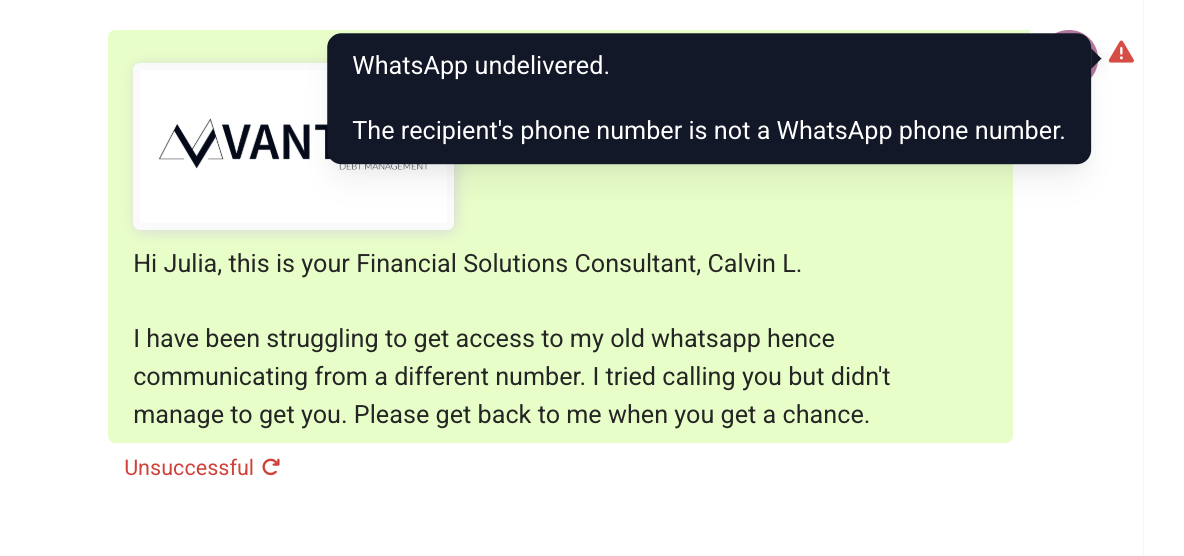
When a WhatsApp message fails with a reason Message Undeliverable it is due to the following reason
- Phone number doesn't have WhatsApp (If you receive a message undelivered error while sending a WhatsApp message, then first you can check if the contact number has WhatsApp activated in it or not. To check that, you can use this link: https://2chat.co/tools/whatsapp-checker.)
- Marketing template limit
- Short Explanation - The User has reached the maximum marketing template in a certain period.
- Long Explanation - To create high-quality user experiences and maximize marketing template message engagement. This may include limiting the number of marketing template messages a person receives from any business in a given period of time, starting with a small number of conversations that are less likely to be read. Note that the limit is determined based on the number of marketing template messages that a person has already received from any business and is not related to your business specifically.
- Short Explanation - The User has reached the maximum marketing template in a certain period.
3:Recipient has not accepted our new Terms of Service and Privacy Policy.
4:Recipient using an old WhatsApp version; must use the following WhatsApp version or greater:
Android: 2.21.15.15
SMBA: 2.21.15.15
iOS: 2.21.170.4
SMBI: 2.21.170.4
KaiOS: 2.2130.10
Web: 2.2132.6
5: customer might blocked the business phone number
Solutions -
- Please create and send a utility template, as there is no limit on utility templates.
- You can ask the customer to initiate a conversation by sending a message